NACS Adapter Not Working? Common Causes and Fixes
Most NACS adapter failures come down to the wrong adapter direction or charging mode, a vehicle or network that has not authorized the session, or a power or thermal limit in the chain. Confirm the adapter’s documented AC or DC rating and vehicle or network eligibility before assuming the hardware is faulty.
When a NACS adapter not working is the reason a charging session fails, the cause usually falls into one of four buckets: the wrong adapter for the connector or charging mode, a vehicle or network that has not authorized the session, a power limit somewhere in the chain, or a firmware and authentication handshake that did not complete. This guide walks through those causes in the order that saves the most time, and it explains when to stop troubleshooting and get qualified help.
- Compatibility: DC adapters are DC-only and AC adapters are AC-only; a physical fit does not.
- Performance: The vehicle’s onboard charger, the EVSE setting, the circuit, and the adapter rating can.
- Safety: Stop using any adapter showing melted plastic, scorched pins, arcing, or abnormal heat.
- Cost: Charging losses mean the energy drawn from the grid exceeds the energy stored, so.
NACS Adapter Not Working: The Short Answer
Most adapter failures are compatibility or authorization problems, not broken hardware. A DC-only adapter will never work on a Level 2 EVSE, an AC-only adapter will never work on a DC fast charger, and a vehicle that has not been enabled by its manufacturer for a given network will not start a session no matter how good the adapter is.
Start by confirming three things: the adapter’s direction (which connector it converts from and to), the charging mode it supports (AC or DC), and whether your specific vehicle is permitted to use that specific charger. Only after those check out should you suspect the adapter itself.
Most Common Causes at a Glance
- Wrong direction or wrong mode: an AC-only adapter used at a DC charger, or a DC adapter used on a Level 2 EVSE.
- Vehicle not enabled: the automaker has not activated DC fast charging access for that network on your VIN.
- Site restriction: some charging locations, particularly older hardware, are not open to third-party vehicles.
- Power ceiling: the vehicle’s onboard charger, the EVSE setting, or the adapter rating caps the session.
- Handshake or authentication failure: payment, account, Plug and Charge enrollment, or software version issues.
- Thermal or physical problem: a hot connector, damaged latch, contaminated pins, or a worn adapter.
First Checks: Vehicle, Adapter, Charger, and Network
Work through these four in order, because each one eliminates a whole category of causes.
- Vehicle: confirm the inlet type, the maximum AC charging rate, and whether DC fast charging access has been enabled for that network. Check for a pending over-the-air software update.
- Adapter: confirm the model number, the connector direction, the AC or DC rating, and the maximum voltage and current it supports. Inspect the pins and latch.
- Charger: confirm the connector on the cable, the charging mode, and whether the station is in service. Read the station label rather than assuming from the brand.
- Network: confirm the site appears as available to your vehicle in the network’s own app or map, and that your payment method or account is active.
Important: Physical fit alone does not prove every AC or DC charging mode is supported.
Adapter Direction, Connector Types, and AC vs DC Compatibility
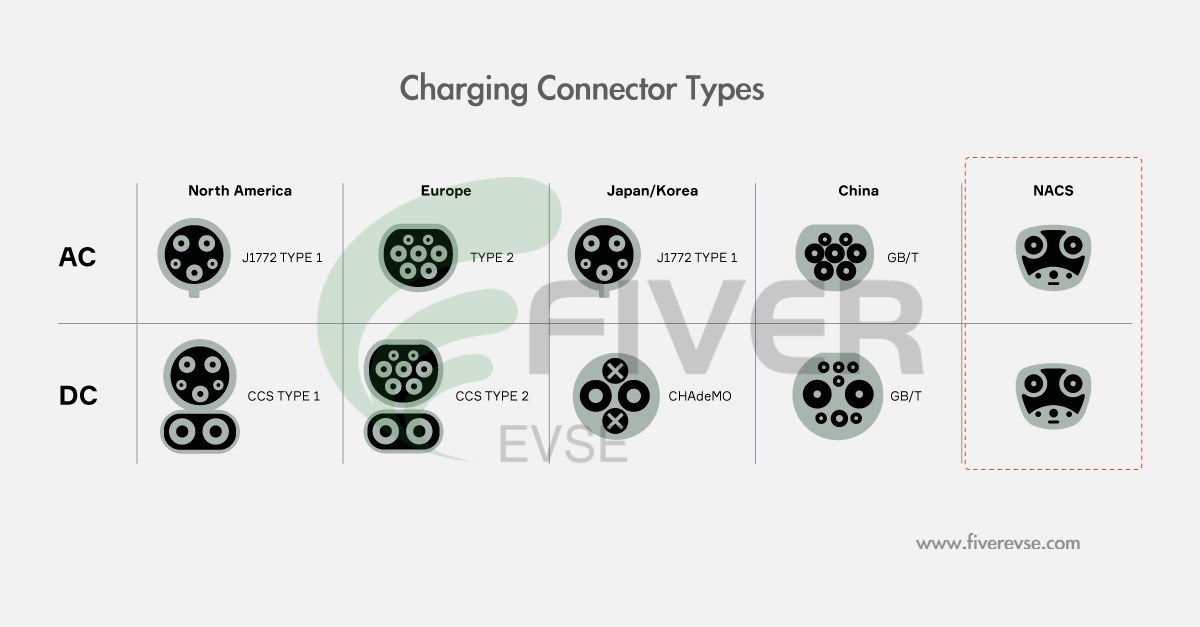
Adapter problems are often direction problems. Every adapter converts from a source connector to a destination connector, and the direction is not reversible. A NACS-to-CCS1 adapter cannot be flipped around to let a NACS vehicle use a CCS1 charger, and vice versa.
Source Connector, Destination Connector, Adapter Direction, and AC vs DC Rules
The practical rules are simple once you separate them:
- NACS-to-CCS1: lets a CCS1-equipped vehicle plug into a NACS DC fast charger. DC only.
- CCS1-to-NACS: lets a NACS-equipped vehicle plug into a CCS1 DC fast charger. DC only.
- NACS-to-J1772: lets a J1772-equipped vehicle plug into a NACS AC EVSE, such as a NACS wall connector or destination charger. AC only.
- J1772-to-NACS: lets a NACS-equipped vehicle plug into a J1772 AC EVSE. AC only.
If a session will not start, the first question is whether the adapter matches the charging mode of the equipment you are standing in front of. A DC adapter on an AC EVSE produces nothing, and an AC adapter on a DC charger produces nothing. No reset will change that.
Vehicle/Network Restrictions and Adapter Type Comparison: Who Each Fits
Compatibility is a two-sided question. The vehicle side and the charger side each have requirements, and both must be satisfied before the adapter matters.
| Adapter type | Vehicle side / charger side | Charging mode | Who it fits |
|---|---|---|---|
| NACS-to-CCS1 DC adapter | CCS1 vehicle inlet / NACS DC charger | DC fast charging only | CCS1 EVs using NACS DC fast chargers where the network permits that vehicle |
| CCS1-to-NACS DC adapter | NACS vehicle inlet / CCS1 DC charger | DC fast charging only | NACS EVs using CCS1 DC fast chargers |
| NACS-to-J1772 AC adapter | J1772 vehicle inlet / NACS AC EVSE | AC Level 2 only | J1772 EVs using NACS wall connectors and destination chargers |
| J1772-to-NACS AC adapter | NACS vehicle inlet / J1772 EVSE | AC Level 2 only | NACS EVs using public or home J1772 EVSE |
Vehicle-side restrictions matter just as much. Automakers enable DC fast charging access for specific networks through software and account enrollment, and that access can be limited by model year, hardware, or software version. On the charger side, not every location is open to every brand, and older station hardware may not support third-party vehicles at all. Always confirm the specific site in the network’s own app before driving there.
Power Limits: Onboard Charger, EVSE Amperage/kW, and Adapter Derating
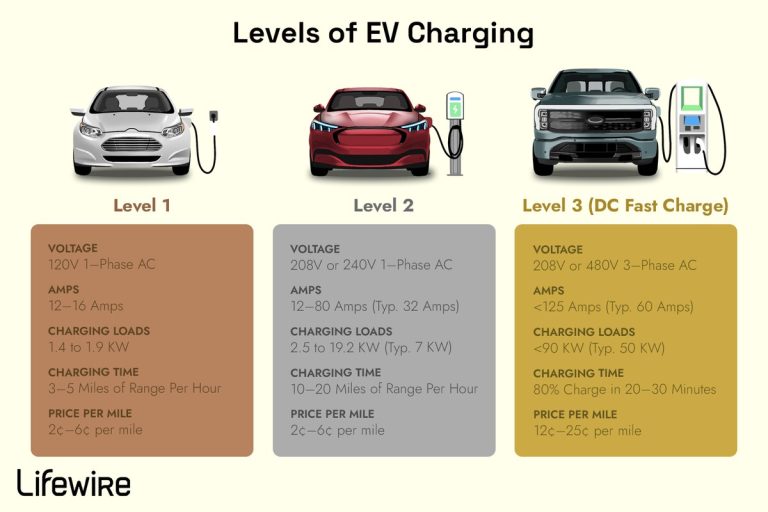
On AC charging, the vehicle’s onboard charger is the ceiling. The EVSE announces how much current is available, and the vehicle draws the lower of that figure and its own onboard charger limit. The circuit behind the EVSE sets the maximum the EVSE can safely offer in the first place.
On DC charging, the adapter becomes part of the power path. If the adapter is rated below what the charger can deliver, the session is capped at the adapter’s rating. Adapters that are not rated for the full voltage or current of a particular station may refuse to start a session entirely, which is a safety behavior rather than a defect.
Why a 48-Amp EVSE May Still Charge Slowly
A 48-amp EVSE does not guarantee 48 amps at the battery. Common reasons for a slower-than-expected AC session include:
- The vehicle’s onboard charger is limited to a lower current, such as 32 A or 40 A, on that trim or model year.
- The EVSE has been configured or de-rated to a lower output setting during installation.
- Power sharing or load management is active because the EVSE shares a circuit or panel capacity with other loads.
- The charging session has tapered because the battery is cold, hot, or near the top of its state of charge.
- A plug-in connection on a lower-capacity circuit limits the available current.
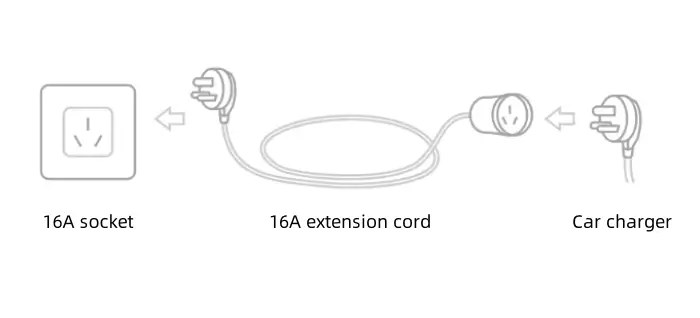
Uses an existing receptacle and can be moved, but the plug and receptacle rating, circuit capacity, and any required protection must match the EVSE instructions and local rules.
Permanently connected, typically for higher continuous current. Requires correct conductors, overcurrent protection, and a qualified electrician following the manufacturer’s instructions.
Adapter Power Limits, Thermal Derating, Plug-In vs Hardwired EVSE, Circuit/Panel, Manual, Local Code, and Who Each Setup Fits
Adapter ratings are published per model and should be read directly from the manufacturer’s documentation rather than assumed from the connector shape. Some adapters are rated for lower current than the stations they physically fit, and some reduce power as they warm up. That behavior is normal thermal management, not a fault.
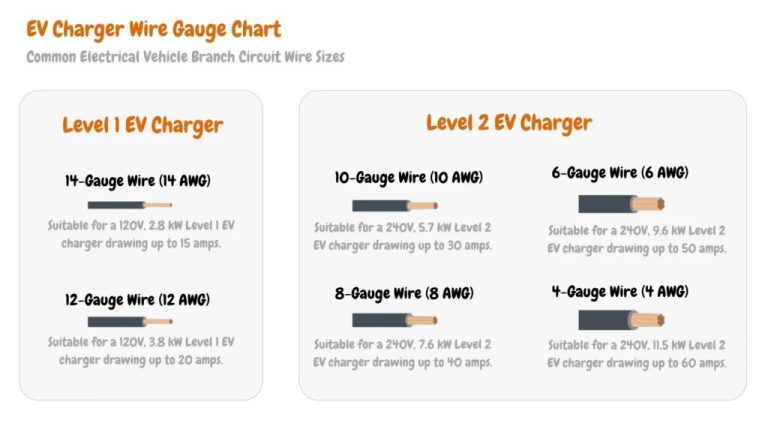
For home hardware, the circuit and panel are the real constraints. Electrical codes generally treat EV charging as a continuous load, which is why charging current is typically limited to a percentage of the branch-circuit rating rather than the full rating. The exact requirement depends on the equipment instructions and the code edition adopted in your jurisdiction.
Firmware, Vendor Requirements, and Handshake Failures

DC fast charging depends on a digital conversation between the vehicle and the charger before any current flows. If that conversation fails, the session stops or never starts, and the screen may show a generic error that says nothing about the real cause.
Some adapters are passive pass-through devices with no electronics and nothing to update. Others include active components. Check your specific adapter’s documentation to find out which type you own before assuming a firmware update is available or needed.
Adapter Firmware, Vehicle Software, Network Authentication, and Owner-Report Limits
When a session fails at the handshake stage, the usual suspects are vehicle software, account and payment setup, and site support.
- Vehicle software: confirm the vehicle is on a software version that supports the network and adapter combination.
- Account and payment: confirm the payment method is valid and the vehicle or account is enrolled where Plug and Charge or automatic billing is required.
- Site support: confirm the specific location supports your vehicle, not just the network as a whole.
- Adapter documentation: confirm the adapter is listed as compatible with your vehicle model and the station type.
Thermal, Safety, and Weather-Related Shutdowns
High-power DC charging generates heat in the connector, the cable, and the adapter. Adapters that manage heat by reducing power are behaving correctly. Adapters that become unusually hot, smell of burning, discolor, or show any sign of arcing are a different situation entirely.
Heat, Cold, Moisture, Cable Condition, and When to Stop Using a NACS Adapter
Cold weather does not usually break an adapter, but it can slow the session dramatically because a cold battery accepts less power. Heat has the opposite effect on hardware: sustained high-power sessions in high ambient temperatures push connectors and adapters toward their thermal limits, and derating is the expected result.
Moisture and contamination matter for outdoor use. Store adapters according to the manufacturer’s instructions, keep pins clean and dry, and check the latch mechanism regularly. A latch that does not seat fully can interrupt a session intermittently, which is one of the hardest faults to diagnose because it may work at one station and fail at the next.
Installation, Cable Length, Smart Features, and Warranty/Support
If your adapter problem is really a home charging setup problem, the variables are different. Mounting height, cable routing, and cable length determine whether the connector reaches your charge port without strain, and a cable under tension can put stress on the adapter and the vehicle inlet.
Mounting, Cable Length, Weather Suitability, Smart Features, Installation, Warranty, and Support
- Mounting and cable length: plan the parking position first. A cable that is too short forces awkward angles that wear connectors.
- Weather suitability: confirm the enclosure rating and operating range for your climate, and follow connector storage guidance.
- Smart features: app-based scheduling, load management, and utility programs can reduce cost, but they depend on connectivity and account services. Confirm what happens if the cloud service or app is unavailable.
- Installation: hardwired installation at higher current generally requires a qualified electrician, correct overcurrent protection, and any required permits and inspection.
- Warranty and support: read the US warranty term and the support process before buying, especially for adapters, since the claim process usually runs through the adapter maker rather than the vehicle manufacturer.
Cost and Charging Losses: What an Adapter Session Really Costs
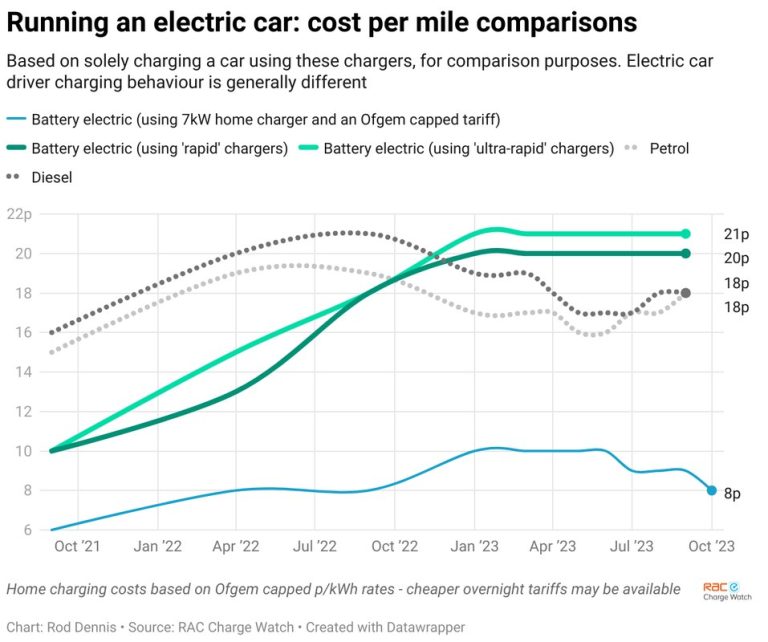
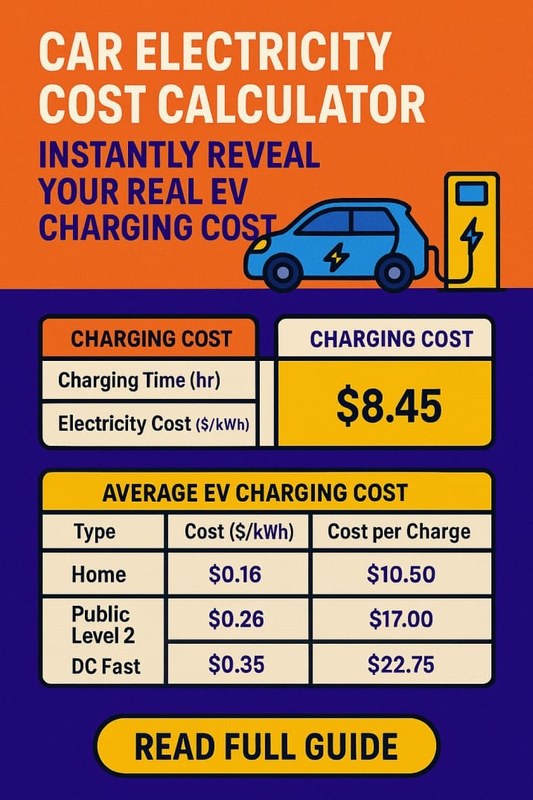
An adapter does not change the electricity rate, but it can change how much energy you actually get for the money. Charging losses mean the energy drawn from the grid is higher than the energy stored in the battery, and those losses are larger on AC charging and in cold conditions.
The basic math is: cost = (energy added to the battery ÷ charging efficiency) × electricity rate. Add taxes, fees, idle fees, and any session or membership charges on top.
These are illustrative assumptions for showing the math, not quoted rates. Utility rates, taxes, time-of-use windows, demand charges, and real-world losses vary and should be verified with your own utility or charging provider.
Electricity Rate, kWh Delivered, Charging Losses, Time-of-Use Pricing, Equipment, and Installation Costs
DC fast charging is often priced per kWh, per minute, or through a membership tier, and idle fees can apply after charging completes. Time-of-use pricing at home can shift the cheapest hours to overnight, which changes the value of scheduled charging considerably. On top of energy, budget for the adapter itself, any EVSE hardware, and installation labor, permits, and inspection where required.
Battery Health and Range/Efficiency Context for Troubleshooting
Some “adapter failures” are actually battery behavior. If the vehicle limits power because of temperature or state of charge, the session will look slow or will stop early regardless of the adapter in the middle.
Manufacturer Guidance, Chemistry, Thermal Management, and Convenience Trade-Offs
There is no universal charging-percentage rule that applies to every EV. Follow your manufacturer’s guidance, which may differ between lithium-iron-phosphate and nickel-based chemistries and between vehicles with different thermal management systems. Frequent DC fast charging is a convenience trade-off, not an automatic failure, but manufacturer guidance and battery temperature management should drive your habits.
Temperature, State of Charge, Charging Power, DC Fast Charging, and mi/kWh or Wh/mi Factors: Speed, Weather, HVAC, Elevation, Payload, Tires, Battery Temp
Range and efficiency estimates vary widely with conditions. Speed, ambient temperature, HVAC use, elevation change, payload, tire type and pressure, and battery temperature all move the number. Charging losses add to the energy you pay for without adding range.
Step-by-Step Fixes and When to Get Professional Help
Work from least invasive to most invasive, and change one variable at a time so you can tell what actually fixed it.
End the session in the app or on the station, unplug fully, wait, then reconnect. Confirm the adapter is seated and latched on both ends.
Try a different stall at the same site, then a different site, then a different adapter. Note exactly what changes when it works.
Check the adapter documentation and the network’s site information for your vehicle. Confirm AC versus DC and the adapter direction.
Safe Reset, Retest, and Testing Another Adapter, Vehicle, or Charger
If a second adapter works on the same vehicle at the same station, the original adapter is the likely cause. If the same adapter works on a different vehicle, the vehicle or its software is the likely cause. If nothing works at that station but everything works elsewhere, the station is the likely cause. This simple substitution logic resolves most cases without any tools.
Documentation, Warranty Claims, and Escalation
Keep a record of dates, locations, station identifiers, error messages, and photos of the connector and screen. That record is what a warranty claim or a network support ticket needs. Escalate to the adapter manufacturer for hardware faults, to the vehicle manufacturer for access, software, or vehicle-side faults, and to the charging network for station faults. If the issue involves a home EVSE circuit, damaged wiring, or any sign of overheating, stop and contact a qualified electrician.
- Best for: Owners who confirm adapter direction, AC versus DC mode, and vehicle or network eligibility before assuming the hardware failed.
- Think twice if: You are relying on one adapter for both AC and DC charging — most adapters are built for one mode only.
- Next step: Verify your adapter’s documented direction and rating against the specific station, then test with a second adapter or a second vehicle to isolate the fault.
Frequently Asked Questions
The most common reasons are an adapter used in the wrong direction or wrong charging mode, a vehicle that has not been enabled for that network, a site that does not support your vehicle, or an authentication or handshake failure. Confirm the adapter’s documented AC or DC rating and the network’s site availability for your specific vehicle before assuming the adapter is defective.
No. NACS-to-CCS1 adapters are designed for DC fast charging only. They will not deliver power from a Level 2 AC EVSE, and using one in that situation will simply fail to start a session. For AC charging you need an adapter rated for AC operation.
The vehicle’s onboard charger is usually the ceiling. If your vehicle is limited to a lower current, or the EVSE has been configured to a lower output, or power sharing is active, the session will be slower than the EVSE’s maximum rating. Cold or hot battery temperatures and a high state of charge also reduce charging power.
Some warmth is expected because high current flows through the connector and adapter. Abnormal signs include melted or discolored plastic, scorched or pitted pins, a burning smell, arcing, or heat well beyond normal warmth. If you see any of those, stop using the adapter and replace it or have the equipment inspected.
It depends on the adapter. Some are passive pass-through devices with no electronics and nothing to update, while others include active components. Check your specific adapter’s manufacturer documentation to determine which type you own and whether any update process applies.
Contact the adapter manufacturer for suspected hardware faults, the vehicle manufacturer for access, software, or vehicle-side issues, and the charging network for station faults. If the problem involves a home EVSE circuit, damaged wiring, or any sign of overheating, stop and contact a qualified electrician.