Tesla J1772 Adapter Not Working? Troubleshooting Guide
Most Tesla J1772 adapter failures come down to wrong adapter direction, an unseated latch, dirty pins, or an EVSE current setting above the circuit or vehicle limit. The adapter is a passive AC-only pass-through, so it will never enable DC fast charging.
A Tesla J1772 adapter not working is usually a fitment, direction, or handshake problem rather than a dead adapter — and most cases resolve with a few checks before you buy anything. The single most common mistake is using the wrong adapter in the wrong direction, or expecting an AC-only adapter to work on a DC fast charger.
- Compatibility: Tesla sells direction-specific adapters; the J1772-to-Tesla version works only with a Tesla NACS inlet.
- Performance: Charging speed is capped by the circuit, the EVSE setting, and the onboard charger.
- Safety: Stop immediately if you see melting, scorch marks, or a hot connector, and get.
- Cost: Include adapter, EVSE, wiring, permits, and labor when comparing charging setups.
Tesla J1772 Adapter Not Working? The Short Answer
Start by identifying which adapter you actually own. Tesla sells adapters in both directions, and they solve opposite problems. If the direction is wrong, no amount of cleaning or reseating will help.
The Five Checks That Resolve Most Failures
Confirm the adapter direction matches your vehicle inlet and the station connector. Confirm the connector is fully seated and the latch is engaged. Inspect pins for dirt, corrosion, or bending. Confirm the EVSE current setting is within the vehicle and circuit limits. Read the error message on the vehicle screen and the station display before assuming the adapter is at fault.
What “Not Working” Usually Means in Practice
Owners typically describe one of four symptoms: the connector will not physically latch, the session starts and immediately stops, charging begins but stalls after minutes, or the vehicle never recognizes a plugged-in cable. Each symptom points to a different part of the chain — connector geometry, the control pilot handshake, thermal derating, or a ground fault.
How the Tesla J1772 Adapter Works: Direction, AC/DC Mode, and the Handshake
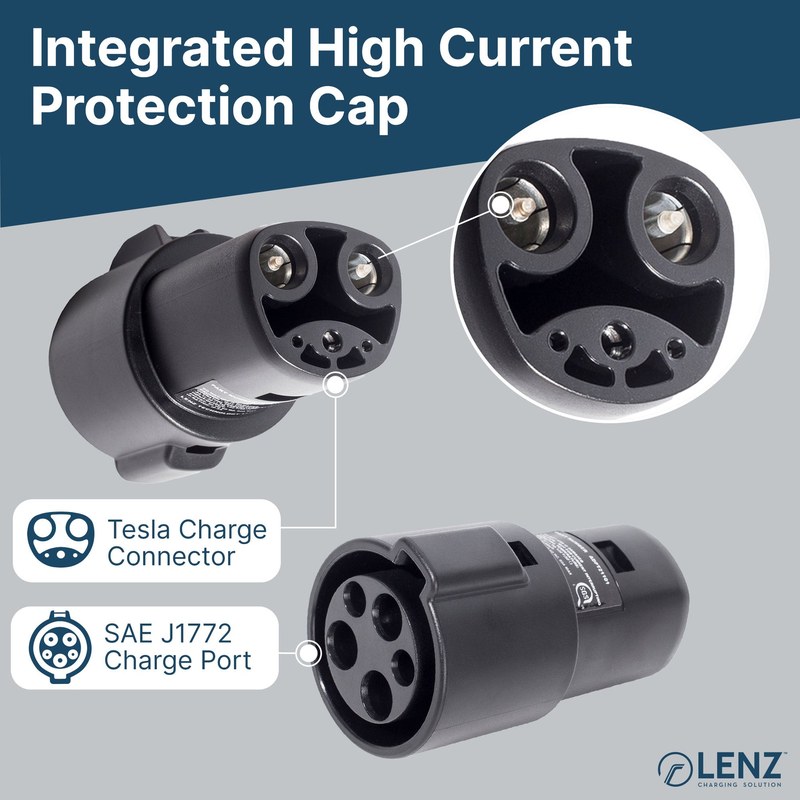
Understanding the electrical path explains nearly every failure mode. The adapter carries conductors and a proximity pilot signal; the actual charging negotiation happens between the EVSE and the vehicle’s onboard charger.
Source Connector, Destination Connector, and Why Adapter Direction Matters
There are two distinct products. One lets a Tesla vehicle plug into a J1772 charging station. The other lets a J1772-equipped vehicle plug into a Tesla NACS (SAE J3400) destination charger. They look similar in photos and are not interchangeable.
AC Only: Why This Adapter Will Never Work on a DC Fast Charger
DC fast charging uses the same physical shell on CCS1 but adds two large DC pins below the J1772 portion, and NACS carries DC over the same pins with a different protocol. An AC adapter has no path for DC current and no way to negotiate a DC session. Plugging one into a DC charger will simply fail to start, and forcing it is unsafe.
The Proximity Pilot, Control Pilot, and Latch Handshake Explained
The vehicle uses the proximity pilot to detect that a connector is present, and the control pilot to negotiate available current with the EVSE. The latch must be fully engaged for the vehicle to allow a session. A worn latch, a partially inserted connector, or a damaged pilot pin interrupts this sequence — which is why “not working” so often means “not communicating.”
A 10-Minute Diagnostic Flow to Isolate the Fault
Work through these in order and stop when the symptom changes. The goal is to identify which link in the chain is failing, not to fix everything at once.
Step 1: Confirm Your Vehicle Port and the Adapter You Actually Own
Check the vehicle inlet and the adapter label against the manufacturer’s product page. Confirm which end is meant to plug into the car and which end receives the station connector.
Step 2: Test the EVSE With a Known-Good Vehicle or Adapter
If a second EV or a different adapter works on the same station, the fault is likely the adapter or the vehicle port. If nothing works there, suspect the EVSE, the circuit, or the station’s access controls.
Step 3: Inspect the Latch, Pins, and Adapter Temperature
Look for bent or discolored pins, debris in the connector body, and a latch that does not click. After a failed session, feel the adapter housing — unusual heat points to a connection-resistance problem that needs professional attention.
Step 4: Read the Error Message on Both Ends of the Connection
Vehicle screens and station displays often state the cause directly: ground fault, communication error, insufficient pilot signal, or session timeout. Photograph both messages before you retry.
The Most Common Causes of a Failing J1772 Adapter — and Their Fixes

Adapter Not Fully Seated or Latch Not Engaged
Push until you feel a positive click at both ends. If the latch will not engage, inspect the latch tab and the vehicle port for debris or damage rather than forcing it.
Dirty, Corroded, or Bent Pins
Use a dry, non-conductive approach — never insert metal tools into a connector. Follow the manufacturer’s cleaning guidance. Pins that are discolored, pitted, or visibly bent mean the adapter or the EVSE connector should be taken out of service.
EVSE Amperage Set Above the Vehicle or Circuit Limit
Many Level 2 stations let the operator or installer set the output current. If the setting exceeds what the circuit or the onboard charger supports, sessions may fault or derate. The adapter itself does not cap current — the vehicle and EVSE do.
Ground Faults, GFCI Tripping, and Missing Ground
GFCI-protected receptacles and EVSE internal ground-fault detection can trip on moisture, damaged cables, or wiring problems. Repeated trips on the same circuit are an electrical issue, not an adapter issue.
Heat Soak, Thermal Derating, and Interrupted Sessions
Long sessions in high ambient temperatures can cause the vehicle or EVSE to reduce current or pause. A session that starts fine and stops after 20 to 40 minutes often fits this pattern rather than a connector fault.
Charge Port Lock, Firmware, and Vehicle Software Conflicts
Some vehicles lock the charge port during a session. If the port lock is stuck or a recent software update changed behavior, the connector may not release or may not be recognized. Check the vehicle’s release procedure in the owner’s manual.
Network, Account, and Access Restrictions at Public J1772 Stations
Many public stations require an app, an account, or a payment method before the contactor closes. A station that never energizes is often an access problem, not a hardware one.
Power Limits: Adapter Rating vs. EVSE Amperage vs. Onboard Charger
What the Adapter Does and Does Not Control
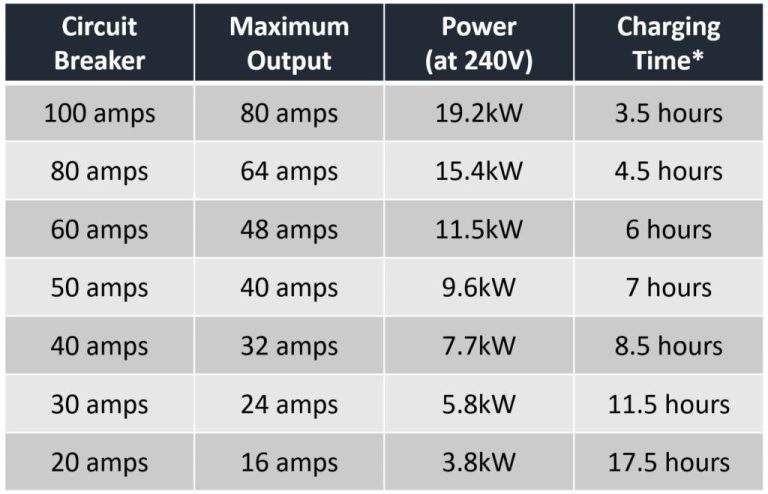
The adapter passes current through. The actual ceiling is the lowest of three values: the circuit’s continuous capacity, the EVSE’s configured output, and the vehicle’s onboard charger rating. If any one of those is lower, that is your real charging rate.
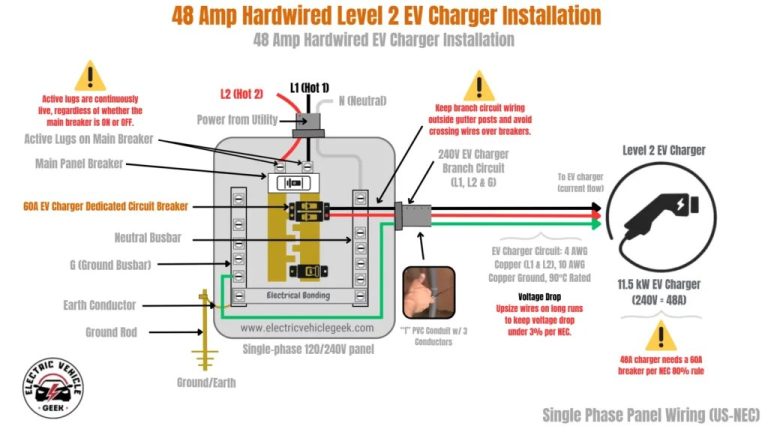
Plug-In vs. Hardwired EVSE and the Panel Implications of Each
Uses a compatible receptacle on a dedicated circuit. Portable and easier to relocate, but receptacle and plug ratings, GFCI rules, and local requirements apply.
Wired directly to a dedicated circuit, often allowing higher continuous current. Typically requires an electrician, a permit, and an inspection.
Cable Length, Weather Suitability, and Smart Features Worth Having
Verify the enclosure rating and operating-temperature range from the manufacturer before mounting outdoors, and check whether the connector needs covered storage. Smart features such as scheduling and load management are useful, but confirm what happens when the app or cloud service is unavailable. Our comparison of the Eviqo 48A and Elegrp 40A J1772 chargers walks through how those criteria differ between two real units.
Cost and Charging Speed Math When You Use a J1772 Adapter
The Formulas: kW, kWh, mi/kWh, and Miles Added per Hour
Power in kW equals volts times amps divided by 1,000. Energy in kWh equals kW times hours. Miles added per hour equals kW times the vehicle’s mi/kWh efficiency. Those three relationships cover nearly every charging-speed question.
Charging Losses and What You Actually Pay For
You pay for energy drawn from the grid, not energy stored in the battery. AC charging losses of roughly 10 percent are a commonly cited planning figure, but the real number varies by vehicle, temperature, and equipment. Label it as an estimate.
Time-of-Use Rates: A Worked Example With Stated Assumptions
These are illustrative assumptions, not a quote. Your utility rate, taxes, fees, time-of-use windows, and losses will differ — verify current rates with your utility.
Equipment and Installation Costs to Include in Your Comparison
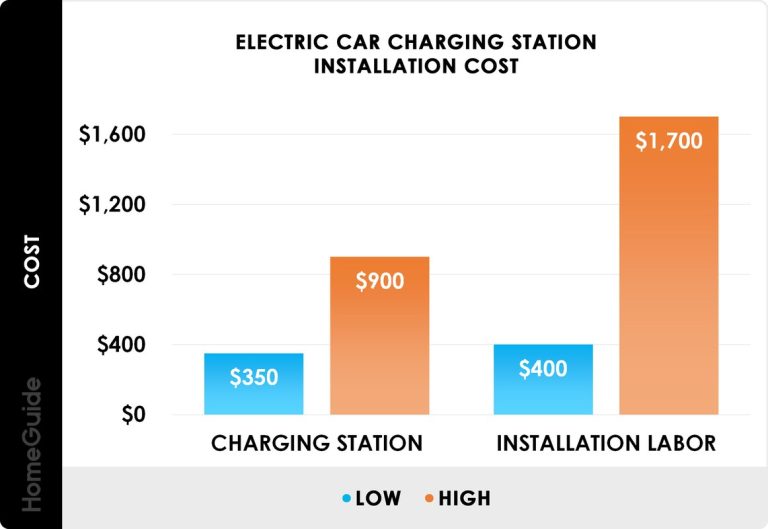
Compare total cost of ownership, not sticker price: the EVSE, any adapter, the circuit and wiring, permits and inspection, and the electrician’s labor. A cheaper unit that requires a panel upgrade is rarely the cheaper option.
Seasonal Efficiency: Temperature, HVAC, and Battery Warm-Up
Cold weather reduces range and can slow AC charging while the battery warms. Summer heat can trigger derating. Neither is an adapter fault, and neither is fixed by replacing the adapter.
Safety, Thermal Limits, and Electrical Code Basics
When to Stop Using an Adapter Immediately
Stop charging and disconnect if you see melting, scorch marks, discolored pins, a burning smell, or a connector that is too hot to touch. Do not continue using that adapter or EVSE connector. Have the equipment and the circuit inspected by a qualified electrician before returning it to service.
Circuit, Breaker, and Permit Rules: Follow the Manual and Local Code
Continuous charging loads are treated differently from short-duration loads, and the applicable requirements come from the equipment instructions plus your local authority. Adoption of electrical codes, permitting, and inspection rules varies by jurisdiction, so verify locally rather than assuming a national standard.
Repair, Replace, or Change Your Charging Setup
OEM vs. Third-Party Adapters: Warranty, Support, and Evidence Limits
OEM adapters are documented against the manufacturer’s own vehicles and support channels. Third-party adapters vary widely in build quality, documentation, and safety listing, and their compatibility claims should be verified against the specific certification record rather than marketing copy. No adapter should be assumed safe or compatible without that verification.
Who Each Option Fits: The Same Criteria, Side by Side
| Option | Fits best when | Main trade-off |
|---|---|---|
| Keep the OEM adapter | You need AC charging at J1772 stations with a Tesla vehicle | AC only; no DC fast charging |
| Add a second adapter | Your household has both Tesla and J1772 vehicles | Two direction-specific parts to track |
| Change the EVSE instead | You charge at home daily and want a native connector | Higher upfront cost and possible electrical work |
Battery Health Habits for Daily AC Charging
Manufacturer Guidance vs. General Patterns
Follow your vehicle manufacturer’s charging guidance rather than a universal rule. Daily AC charging is generally the gentler option compared with frequent DC fast charging, but the right state-of-charge target depends on your battery chemistry, thermal management, and how you use the car.
State of Charge, Temperature, and the DC Fast Charging Context
Extreme states of charge combined with extreme temperatures are the conditions most often discussed as stressful for lithium-ion packs. For most drivers, the practical takeaway is convenience-driven: charge to what you need, avoid leaving the pack at extremes for long periods, and let the vehicle manage preconditioning. For a closer look at how amperage settings affect daily charging, see our notes on whether a Tesla can charge at 48 amps and on charging a Tesla at 40 amps.
Frequently Asked Questions
Check whether the station requires an app, account, or payment method before it energizes. If the station works for another vehicle, the issue is likely the adapter, the latch engagement, or a pilot-signal fault rather than the station itself.
No. The adapter is AC-only. DC fast charging requires a different connector and a different communication protocol, and there is no DC current path through an AC adapter.
Check the manufacturer’s product page and the labeling on the adapter. One product connects a J1772 station to a Tesla vehicle; a separate product connects a Tesla NACS charger to a J1772 vehicle. They are not interchangeable.
Common causes include thermal derating in hot conditions, a ground-fault trip, a loose latch, or a vehicle software or charge-port lock issue. Read the error message on both the vehicle screen and the station display before replacing hardware.
The adapter does not set current. The real limit is the lowest of the circuit’s continuous capacity, the EVSE’s configured output, and the vehicle’s onboard charger rating.
Stop if you see melting, burn marks, discolored or pitted pins, a burning smell, or a connector that is too hot to touch. Do not keep using that adapter or EVSE connector, and have the equipment and circuit checked by a qualified electrician.